Every screenshot. Every article. Always up to date.

SnapSteward gives you one central hub for all your documentation screenshots. Embed once, update everywhere, so your help center always matches your product.

Works with Helpscout No scripts needed Set up in under 10 minutes 30-day free trial
SnapSteward screenshot overview, all your documentation screenshots in one place

Sound familiar?

You know your screenshots are outdated. Your users know it too.

After every release: a screenshot hunt

Manually clicking through all your articles, replacing outdated images one by one. Every two-week sprint, half a day gone.

Outdated screenshots create support tickets

Users follow your instructions but the interface looks different. Confusion turns into support tickets, for questions your docs should have answered.

No overview, impossible to delegate

No system, no list of what's outdated. You're the only one who knows where to look, which means it only gets done when you do it yourself.

How it works

Set up in minutes. Save hours every release.

One central hub for all your documentation screenshots. Always know which ones are current. Update them everywhere in one go.

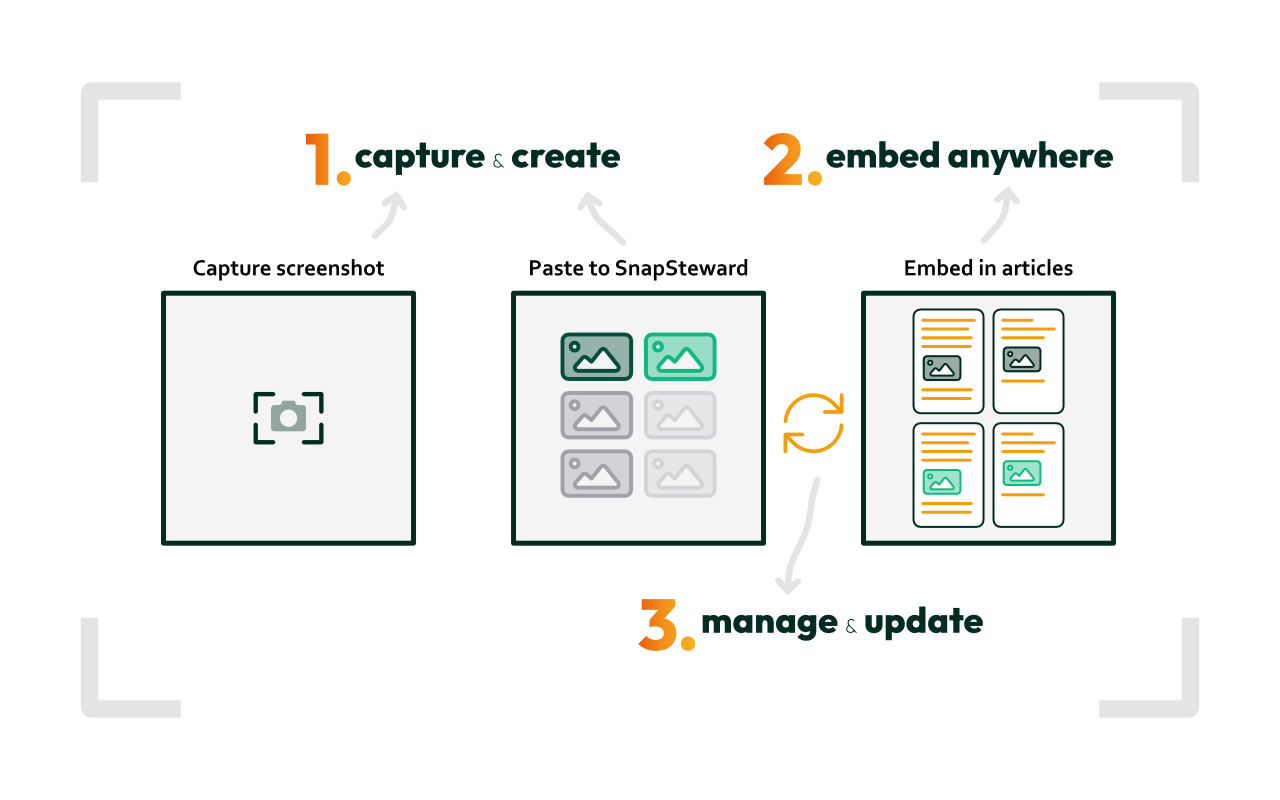
How SnapSteward works: import, embed once, update everywhere

1 Import or capture

Import all your existing Helpscout screenshots in one click, or paste new ones directly into SnapSteward. Add alt-text and a source URL so you can quickly re-capture when needed.

2 Embed once

Copy one embed code and place it in as many articles as you like. SnapSteward serves the image, no duplicate uploads, no broken links.

3 Update everywhere

Replace one screenshot. It updates in every article that uses it, instantly. No more hunting through articles. No more missing one.

Works with Helpscout

One-click import of all your existing screenshots
SnapSteward replaces your Helpscout image URLs automatically
See exactly which articles use each screenshot
Update a screenshot, changes appear in Helpscout immediately

Import your entire Helpscout screenshot library in one click. SnapSteward automatically replaces your existing image URLs with embed codes, so you can start managing everything from one central place, without rebuilding a single article. No scripts, no engineering work required.

Try it free for 30 days →

Central overview

Know exactly what's where

One secure hub for all your screenshots
See which articles use each screenshot
Tag and search instantly
Organize by product or project

For the first time, you have a complete overview of all your documentation screenshots in one place. You know exactly which screenshot is used in which article, so you can update the right ones, and be confident nothing is missed.

Try it free for 30 days →

Track & update

Every release, under control

Mark outdated screenshots with one click
Assign ownership, make it delegatable
Update once → refresh everywhere
At every release, start with SnapSteward, not a folder of screenshots

At the start of every release, open SnapSteward and see exactly which screenshots need attention. Mark them outdated, assign an owner, and update each one once. That's it. No more manual article-by-article hunt.

Try it free for 30 days →

Pricing

Simple pricing. No surprises.

One plan. Everything included. No approval needed at €9,95/month.

Monthly

€9,95 /month

Pay month by month. Cancel any time.

  • Up to 500 screenshots
  • Unlimited users
  • Helpscout integration
  • Embed once, update everywhere
  • ISO 27001 certified
  • 30-day free trial
Start free trial
1 month free

Annual

€9,12 /month

Billed €109,45 once a year. You save €9,95, one month free.

  • Up to 500 screenshots
  • Unlimited users
  • Helpscout integration
  • Embed once, update everywhere
  • ISO 27001 certified
  • 30-day free trial
Start free trial

No credit card required to start your trial. Cancel any time.

Security & Reliability

ISO 27001 certified
Encrypted storage and connections
Proven uptime, live status available
Built on Toolsfactory infrastructure, in production since 2014

SnapSteward is built on the same infrastructure as OGSM.online, a platform used daily by organizations worldwide. Your screenshots are stored securely, connections are encrypted, and uptime is monitored continuously. If your developer or CTO wants to review the security setup, our ISO 27001 certification gives them everything they need.

Our story

Built by Toolsfactory
We had the same problem you have now
We built SnapSteward for ourselves, and it worked

We're Toolsfactory, a Dutch software company. We ran into the same problem while maintaining the help center for our own product, OGSM.online: every release, screenshots became outdated overnight. No lightweight solution existed, so we built one. SnapSteward solved it for us, and now it can solve it for you too.

Contact Toolsfactory

Frequently asked questions

Do I have to rebuild all my articles to migrate?
No. The Helpscout import does it automatically in one click. SnapSteward imports your existing screenshots and replaces the image URLs in your articles. You don't need to touch a single article manually.
Does my developer need to be involved?
No scripts or engineering work required. You can set up SnapSteward yourself in minutes. If your developer or CTO wants to review the security setup, our security page and ISO 27001 certification give them everything they need.
What if SnapSteward shuts down?
SnapSteward is built by Toolsfactory, a stable Dutch software company running production software since 2010. We use SnapSteward ourselves for OGSM.online, so we have every reason to keep it running. We're ISO 27001 certified and have a proven track record with enterprise clients.
Can't I just solve this with a better checklist?
A checklist helps with discipline. SnapSteward helps with scale. When you have 200+ screenshots across dozens of articles, manually tracking what's outdated is unreliable; the list itself becomes a maintenance job. SnapSteward gives you the overview that makes documentation maintenance systematic, without the overhead.
Which documentation platforms do you support?
SnapSteward has a native integration with Helpscout, including one-click import and automatic URL replacement. For other help centers, you can embed screenshots manually using the provided embed code. Support for additional platforms is on the roadmap.
Is there a free plan?
There's no permanent free plan. Every new account starts with a 30-day free trial, no credit card required. After the trial, it's €9,95/month or €9,12/month billed annually.
What happens to my screenshots if I cancel?
You can export all your screenshots at any time. If you cancel, your embed codes will stop serving images when your subscription ends, so it's worth replacing them before cancelling. We'll remind you before that happens.

Your users deserve documentation they can trust.

Stop losing hours to screenshot maintenance. Keep your help center accurate with less effort, starting today.

No credit card required. €9,95/month after trial.